Software for Windows

Your files,
at a glance.

Lovely Peek displays, organizes, and prepares your images, PDFs, Illustrator, and Photoshop files. A gentle, precise tool, made for people who create.

Coming soon · Windows Take a peek

JPEG · PNG · WebP · TIFF · HEIC1 · PDF · AI2 · PSD and more 1 Windows may require Microsoft's HEIF and HEVC extensions, some of which may not be free. 2 Illustrator files saved with the “Create PDF Compatible File” option.

Lovely Peek window: the “Studio” folder as thumbnails (poster, fabrics, color swatches, PDF lookbook, AI and PSD files), with the inspector showing the selected poster, its dominant colors, and its details.

Screenshot taken in Lovely Peek with demo files.

In pictures

Everything you see here already exists.

Screenshots taken in Lovely Peek with demo files, in the Free edition.

Quick preview of a 6-page PDF lookbook, shown full size over the thumbnails.
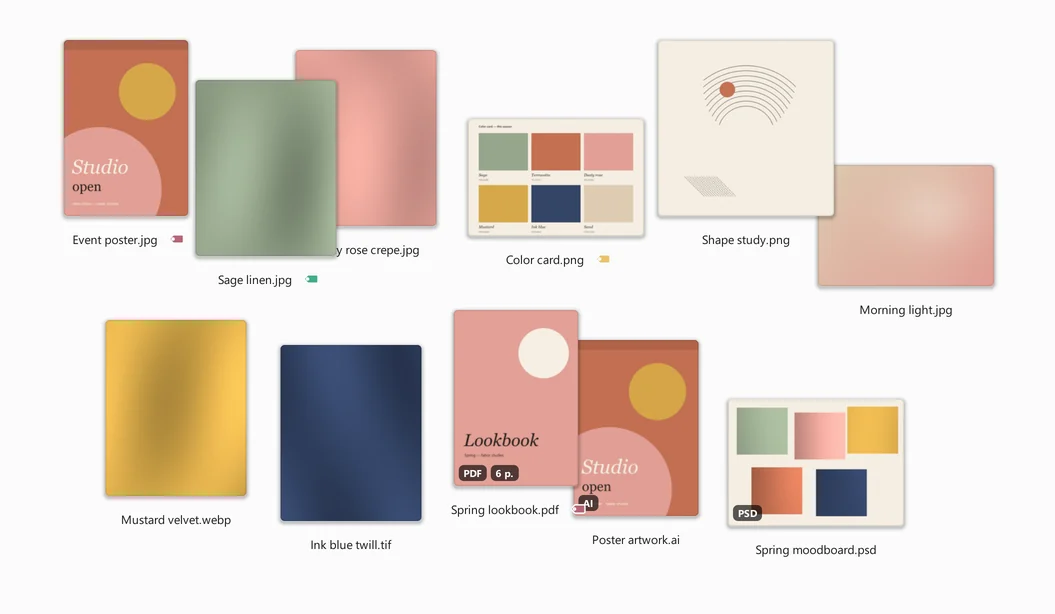
Freeform layout: thumbnails of fabrics, posters, and documents placed freely, some of them overlapping.
PDF pages window: six pages as numbered thumbnails.
Two fabrics compared side by side: sage linen and dusty rose crepe.
Print window with the page preview and the settings.
The same window in the dark theme.

Features

See, organize, prepare.
Straight to the point.

Quick preview

One key, Space, and your file opens full size. Thumbnails also show up for your Photoshop and Illustrator files.

  • Images: JPEG, PNG, WebP, GIF, BMP, TIFF
  • PDF, page by page
  • Illustrator (AI), if saved with the “Create PDF Compatible File” option
  • Photoshop: PSD and PSB
  • iPhone photos (HEIC), with Microsoft's extensions, some of which may not be free
Organization

Seven color tags you can rename, to track a project's progress at a glance.

  • Sort by name, date, type, or file size
  • Search by file name
  • Your favorite folders in the sidebar
  • Dominant colors of each image in the inspector

PDF

Read and page through your PDFs, see all their pages as thumbnails, and turn an image into a PDF.

Printing

An exact preview of the page, then paper, orientation, scale, margins, color or black and white.

Simple edits

Rotate your images and PDFs, with no quality loss for JPEGs; crop to common proportions (square, 4:5, A4…), resize, compare two images.

Freeform layout

Your folder, like a worktable.

Bring together, spread out, overlap: compose your mood boards down to the pixel, right from your files.

1
Your files stay putOnly the thumbnails move. Nothing is written to your folders.
2
Your layout is rememberedEven after you close the app, change the thumbnail size, or sort differently.
3
A folder in one moveHold a thumbnail over another one for a moment: Lovely Peek offers to make them into a folder.
Thumbnails arranged freely, in overlapping groups.

Editions

Start for free.

The essentials are in Free. Pro, in the works, will add batch processing.

Free

Forever

Everything to view and organize

  • Quick preview and thumbnails: images, PDF, PDF-compatible AI, PSD, HEIC
  • Tags, sorting, search by name, dominant colors
  • Freeform layout and folders created by drag and drop
  • Compare images, read and page through PDFs
  • Rotate images and entire PDFs, even several at once; crop and resize an image
  • Print, one image per page
  • Rename, export, convert to PDFone file at a time
  • “Open with Lovely Peek” in the Windows right-click menu

Pro

Coming soon

For batch production

  • Everything in Free
  • Batch processing: rename, resize, export, combine into a PDF
  • Edit PDF pages: rotate a specific page, delete, extract, add
  • Compress PDFs, resize them
  • Print 2, 4, or 9 images per page; run a preflight check on a file
  • AI background removal and upscalingprocessed on your computer
  • Search by color

€7.99 per month or €59.99 per year, VAT incl. Opening soon: discover Pro.

Privacy

Your files stay with you.

Lovely Peek works entirely on your computer. Your creations never leave your drive.

Everything is processed locally

Thumbnails, previews, edits, and dominant colors: no file is ever sent anywhere.

Even the AI

The background removal and upscaling models come with the app and run on your computer, offline.

Your folders stay clean

Tags and layouts are kept by Lovely Peek, with no hidden files added to your folders.

Your feedback matters

Lovely Peek grows with you.

An idea, a problem, an impression: your feedback helps us shape Lovely Peek.

An idea

A feature you're missing, a simpler way to do something? Tell us what would help you day to day.

Suggest an ideaComing soon

A problem or bug

Something not working as expected? The prepared message helps you describe what happened.

Report a problemComing soon

A problem with the website

A link that goes nowhere, something displaying oddly, a page that gets stuck? Tell us what you saw.

Report a site issueComing soon

Don't send personal or confidential files. A description is enough; if you add a screenshot, make sure it doesn't show anything private.

The buttons will become active as soon as the contact address is available.

Email app not opening? Write directly to contact@lovelypeek.com.

Hello,

My idea for Lovely Peek:


What it would help me do:


Thank you!
Hello,

Lovely Peek version (⋯ menu › About Lovely Peek):
Windows version:

What I was doing:


What happened:


What I expected:


Does it happen every time? (yes / no / sometimes):
Hello,

What I like about Lovely Peek:


What could be simpler:


How I use it (profession, file types):
Hello,

Page (address or section name):
Device (computer, phone, tablet):
Browser (Edge, Chrome, Firefox, Safari…):

What isn't working:


What I expected:

Questions

Good to know

When can I download Lovely Peek?

Soon. The app is being finalized and no date has been announced yet. There is no version to download yet.

What computers does it run on?

Lovely Peek is Windows software. There is no Mac version for now.

How much does it cost?

The Free edition costs nothing. The Pro edition is in the works: its price hasn't been set yet.

Are my files sent over the internet?

No. Everything is processed on your computer, including AI background removal and upscaling.

Does the freeform layout move my files?

No. Only the thumbnails move on screen: your files stay exactly where they are, and nothing is written to your folders. You can go back to the grid at any time.

Why aren't my iPhone photos (HEIC) showing up?

For HEIC files, Lovely Peek uses the decoder built into Windows. You need Microsoft's “HEIF” and “HEVC” extensions, available in the Microsoft Store, the same ones the Photos app uses. Some of them may not be free.

Why isn't my Illustrator (AI) file showing up?

Lovely Peek reads the PDF version stored inside an Illustrator file. If the file was saved without the “Create PDF Compatible File” option, that version doesn't exist, so Lovely Peek shows “Preview unavailable.” Re-save it from Illustrator with that option checked.

Take a peek at your files, differently.

Coming soon · Windows
What's new? Release notes

Tap the image to zoom · Esc or ✕ to close